
Rolling out AI is a real commitment for your team. Your provider should be beside you at every step from deployment to training and service.
Spooky season is a good time to talk about the story retail teams tell each other in the break room. A provider arrives with a polished demo and a promise that AI will solve the problem. Leadership approves, the rollout begins, and the tool lands on the people who work the floor. They must fill in the gaps, learn the system on their own time and wonder why a solution that looked effortless in the demo feels like extra work. Some commentators now call the leadership side of this pattern “AI psychosis,” an informal label for decisions driven by hype before the hard parts of adoption are planned and executed.
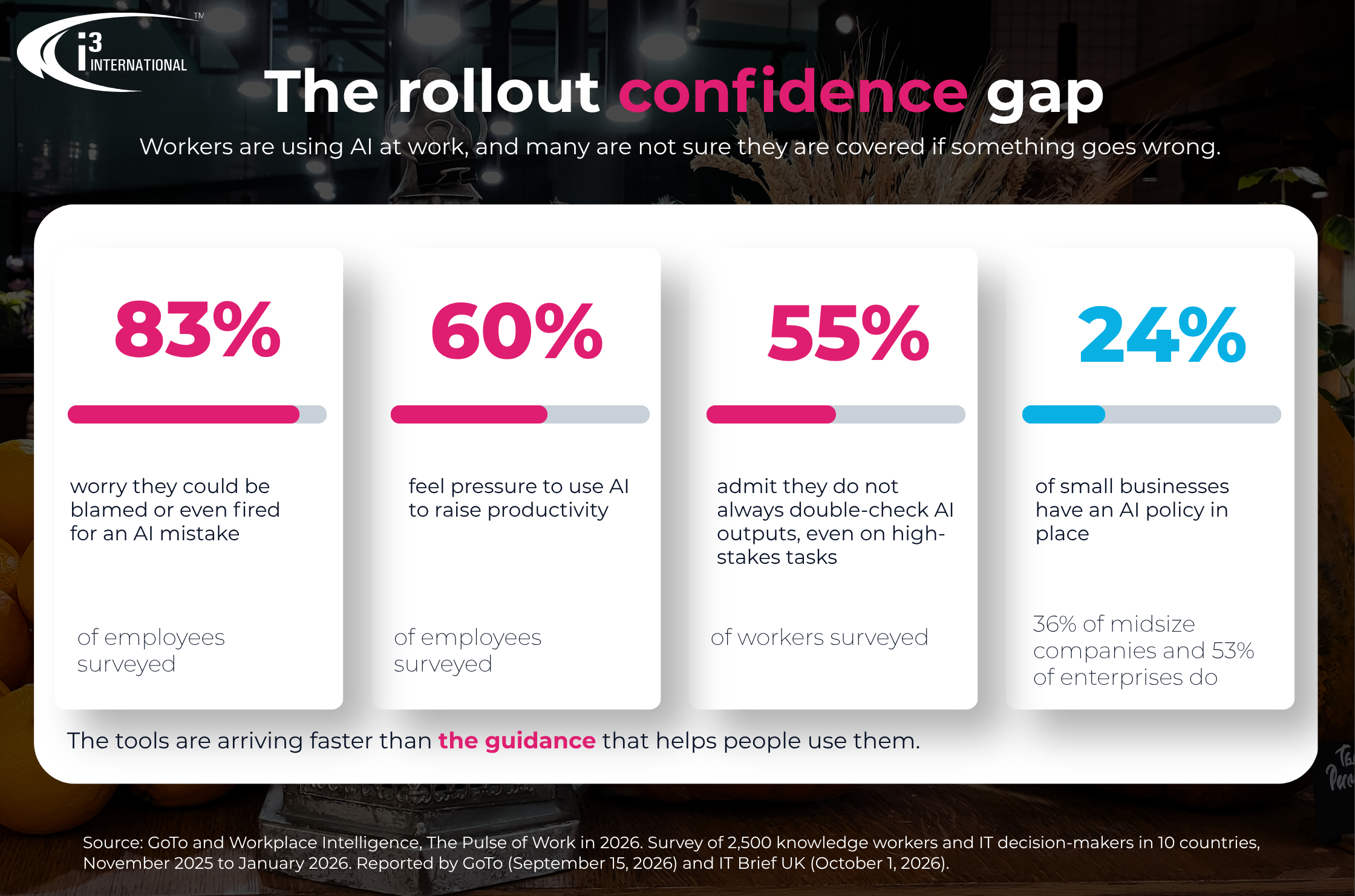
The research points in the same direction. In a survey of 2,500 employees and IT leaders by GoTo and Workplace Intelligence, 83% of employees feared being blamed or fired over an AI-driven mistake, and 60% felt pressure to use AI to raise productivity. Only 24% of small businesses and 36% of midsize companies reported having an AI policy in place. The tools are arriving faster than the guidance that helps people use them.
We know this happens, and taking on AI is a real commitment for any team. That is why the provider should carry its share. The right partner brings the tools, the training, the knowledge, a full deployment and customer service that keeps working after installation, so the rollout succeeds in the store as well as in the boardroom. This guide outlines what retail teams should expect at each step and what to ask before signing.
Most retail teams choose their AI provider through a system integrator, so the rollout depends on that relationship and on the software. i3 is a B2B company that works diligently with our partner integrators to ensure they have the tools and training they need to deploy and support our solutions for new and existing customers. The i3 project management team stays on hand throughout implementation to help it succeed and ensure users and stakeholders receive the training they need. We also offer custom training upon request. With i3 Concierge Plus, a dedicated Concierge project manager is available to meet with the system integrator for a pre-installation discussion, ensuring installation requirements are met and the process goes smoothly.

1. The hype gap: why rollouts leave store teams holding the bag
A demo shows the best day of a product. A rollout has to work on the busiest day, with the newest hire, in a store whose routines were built long before the tool arrived. The GoTo survey puts a number to the distance between the two. Employees who use AI said it saves them an average of 2.3 hours a day, yet 31% had hesitated to use it for fear of the consequences of an error. More than half (55%) said they do not always review or double-check AI outputs, and 42% would rather risk errors with AI than appear slow or replaceable.
Managers feel it too. A TechCrunch report on a survey published on October 21, 2026, found that 58% of managers expect to oversee more AI agents than human employees within a year, and 46% worry about losing control over those agents’ actions.
Retail teams were not the focus of these surveys, which covered knowledge workers and IT decision-makers. The questions they raise apply to any team handed a new tool: who owns it, who trains people on it, and who answers when it behaves in a way nobody expected.
What to look for: A named owner on the provider’s side and on yours, a training plan that covers the people who will use the tool every day, and a clear path for questions after installation.
What good looks like: The provider can describe each stage of the rollout, from the first planning conversation through the first quarter of use, and name who is responsible at each stage.
Questions to ask: Who will be my contact during implementation? What happens in the first 90 days? Who do store managers call when something looks wrong?
How i3 helps: Any provider can promise support, but the difference lies in whether the promise includes names and steps. i3’s project management team stays on hand throughout implementation to help it succeed, and the sections below detail what that entails.
2. Tools: keep the daily routine simple
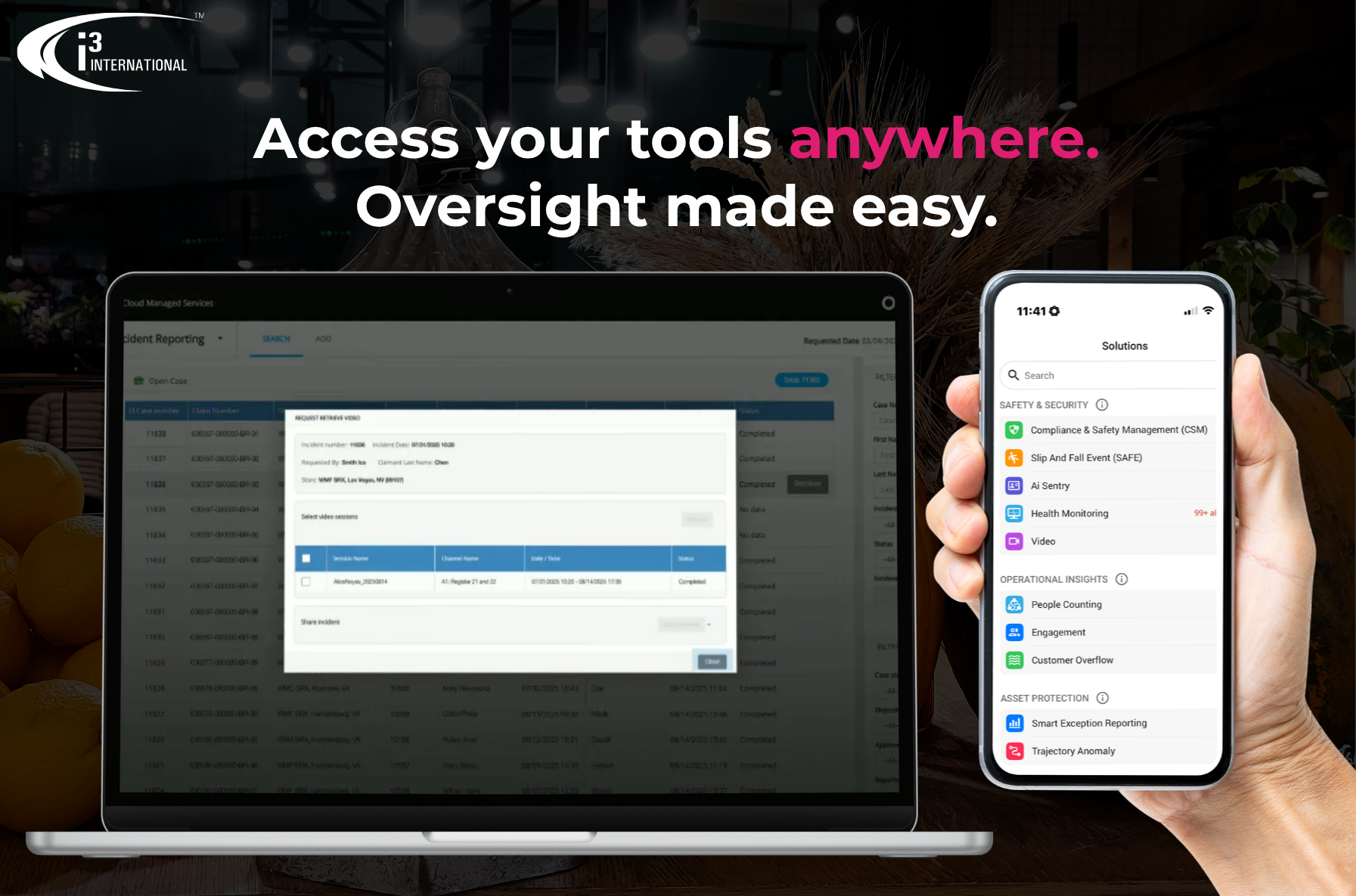
Tools tend to be adopted when they fit the way the day already runs. A tool that needs a separate login, a separate screen and a separate habit competes with everything else on the floor. Ask what a store manager does with the tool on an ordinary Tuesday, and how many steps it takes to go from an alert to a decision.
What to look for: Access on the devices managers already carry, alerts that arrive with the context needed to act on them, and records that make a review quick.
What good looks like: A manager can see what happened, see the video or record that goes with it and act in a few steps.
Questions to ask: Where will my team use this, on a desktop, on a phone or both? Does an alert include what the manager needs to decide?
How i3 helps: Users view live and recorded video through i3’s remote viewing tools, VPC, CMS Mobile, or on a PC via our i3Host page. i3Host acts as a single pane of glass, allowing full operational oversight.
3. Training: everyone who touches the tool, from the IT lead to the store floor
In the GoTo survey, 84% of workers felt their employer could do more to encourage responsible AI use. Training is where that gap closes. The people who log in every day, the managers who review the results and the stakeholders who approve the budget each need something different, and a single kickoff call is unlikely to cover all three.
What to look for: Training planned by role, scheduled both before and after go-live, and available again when staff change.
What good looks like: New hires and new managers have a path to the same training the original team received, and the provider will build a session around your stores’ real routines when asked.
Questions to ask: Who delivers the training, and how often is it available? Can it be customized for my stores? What happens when a manager leaves, and a new one joins?
How i3 helps: The i3 project management team ensures users and stakeholders receive appropriate training, and custom training is always available upon request through the project managers. i3 customers can also request a remote end-user training session that covers remote viewing (VPC and CMS Mobile) and/or the CMS. As a B2B company, i3 also works with integrators to make sure they have the tools and training they need, so the people installing and supporting your system know it well.
4. Full deployment: configured for your goals
Installation puts hardware on the wall. Deployment makes the system report what your business needs to know. The gap between the two is configuration, so it is worth asking who does that work.
What to look for: A provider that configures the system against your stated goals and checks that the data it produces is accurate.
What good looks like: Settings match the outcomes you set at the start, and someone confirms that the data in the dashboards reflects what happens in the store.
Questions to ask: Who configures the system, and do they work from my project goals? Who checks the data once it is running? What does the provider need from my IT team?
How i3 helps: The i3 Concierge team completes remote configuration of i3 products and provides guidance for correct hardware installation as required. That covers the i3 Media Server, camera configuration for i3Ai detection and video recording, and i3Ai functionality configuration for accurate CMS data, with settings kept consistent with the customer’s intended project goals. With i3 Concierge Plus, a dedicated Concierge project manager is assigned to the end user and is available for a pre-installation discussion with the system integrator.

5. Ongoing service: what happens on day 31 and day 300
The first week of a rollout gets the attention. The test comes later, when a report needs tweaking, a new hire needs training on the software, a camera needs attention, or a question about a result needs a person on the phone.
What to look for: A defined support window after go-live, a way to continue support beyond it and an experienced person who answers.
What good looks like: The provider monitors the system, tells you about problems before you find them and reports on what it did.
Questions to ask: How long does the provider stay closely involved after deployment? What does support look like after that? Is there a dedicated line?
How i3 helps: i3 stays with customers after deployment for ongoing support, and support can always be scheduled upon request afterward. i3 Concierge Services extends the relationship. Both tiers include a dedicated priority phone line, remote configuration, automated CMS health monitoring with a daily email and end-user training. i3 Concierge Plus adds:
- Daily monitoring of i3 Media Servers and connected cameras. The Concierge team first tries to resolve issues remotely and escalates the rest to the system integrator or end user.
- A quarterly service report summarizing the service tickets completed in the past quarter.
- A dedicated Concierge project manager who reviews server health, troubleshoots remotely and escalates issues that need an on-site technician.
- Security and critical patch management.
- Extended Advanced Replacement, which extends i3’s standard 45-day Advanced Replacement policy to the first calendar year after purchase, with replacement units shipped from i3’s repair depot for the rest of the contract period, up to 5 years.
Customers describe the difference in their own words. Corey Freeman, Director of Loss Prevention at Cosentino’s, says: “i3’s level of service has been absolutely fantastic and their customer support is always on point and we have never had a better product in our building.”

6. Accountability: who owns the result when something goes wrong
The GoTo survey found that 26% of employees said AI lets them avoid personal accountability, 25% said it feels safer to blame AI than to admit a mistake, and 14% had reported an AI error to a manager and been told to stay quiet. A store team needs the opposite environment, where a question about a result is welcome and has an owner.
What to look for: A written AI policy, a clear review step for the results that matter and a provider that keeps records.
What good looks like: Everyone knows who reviews what, and nobody is blamed for asking whether the system got it right.
Questions to ask: Who reviews the output? Where is it recorded? What does the provider report back to us, and how often?
How i3 helps: With i3 Concierge Plus, the Concierge team maintains records of system health issues and reports on them quarterly, and it escalates issues it cannot resolve remotely to the system integrator or end user, so each issue has a clear owner.
What should an AI provider deliver after installation?
An AI provider should deliver five things after installation. These are the points to check in any proposal:
1. A named contact through implementation. Someone responsible for making the rollout succeed.
2. Training by role. Sessions for daily users, managers and stakeholders, repeated as staff change.
3. Configuration against your goals. Settings matched to the outcomes you set, with a check on the data.
4. A support window and a way to extend it. Clear terms for the first months and for the years after.
5. Reporting and escalation. Regular summaries of what the provider found and who owns each open issue.

Frequently Asked Questions
What does “AI psychosis” mean in a business setting?
It is an informal label some commentators use for leadership decisions driven by AI hype, where a solution is approved and rolled out before the work of training, configuring and supporting it is planned. It is not a clinical term. In this sense it describes a rollout pattern, and the remedy is a plan with owners, supportive training and services.
What goes wrong in AI rollouts?
Once a system its implemented, it becomes easy for solution providers to move onto the next deal without ensuring proper training and understanding amongst the people who will be working with the system daily. This leads to confusion, misuse of tools, and time spent trying to understand and fill in the gaps that were not originally explained during deployment.
What should I ask an AI provider before I sign?
Ask who your contact is during implementation, how training is delivered and repeated, who configures the system and checks the data, how long the provider stays closely involved after go-live, and what reporting you receive.
What training should store teams get?
Daily users, managers and stakeholders each need training suited to their role, with a path for new hires. i3 makes sure users and stakeholders receive appropriate training through its project management team, offers custom training on request and arranges remote end-user training sessions on remote viewing and the CMS.
What support does i3 provide after deployment?
i3 stays with customers for 90 days after deployment, and support can be requested after that. i3 Concierge Services adds a dedicated priority phone line, health monitoring and end-user training, and i3 Concierge Plus adds daily monitoring, quarterly reports, a dedicated project manager, patch management and Extended Advanced Replacement.
Does i3 work with integrators?
Yes. i3 is a B2B company and works with integrators to make sure they have the tools and training they need to deploy and support i3 solutions for end users.
Ready to see what a supported rollout looks like?
A good AI solution needs a good rollout behind it. Talk to the i3 team about how implementation, training and service work for your stores.
Request a demo to see how i3’s solutions and support help grocery and specialty retail teams get value from AI from the first week.
Sources
- IT Brief UK. (2026, October 1). Employees fear blame over AI mistakes, survey finds (GoTo and Workplace Intelligence survey of 2,500 employees and IT leaders). https://itbrief.co.uk/story/employees-fear-blame-over-ai-mistakes-survey-finds
- (2026, October 21). AI promises productivity, but for managers, it’s mostly a headache for now, says new survey. https://techcrunch.com/2026/10/21/ai-promises-productivity-but-for-managers-its-mostly-a-headache-for-now-says-new-survey/
- Do You Have AI Psychosis? Turns Out a Lot of CEOs Do, According to the CEO of Box (use of the term in a business context). https://www.inc.com/joe-procopio/do-you-have-ai-psychosis-turns-out-a-lot-of-ceos-do-according-to-the-ceo-of-box/91353718